Docs › Agent › How the agent checks its work
How the agent checks its work
The checks that run before an agent run may say it is done: your project's own checks, the sabotage check, an independent evaluator, and the UI check.
On this page
- Your project's checks
- The sabotage check
- The evaluator
- The UI check
- Before the checks
- Settings
- If something goes wrong
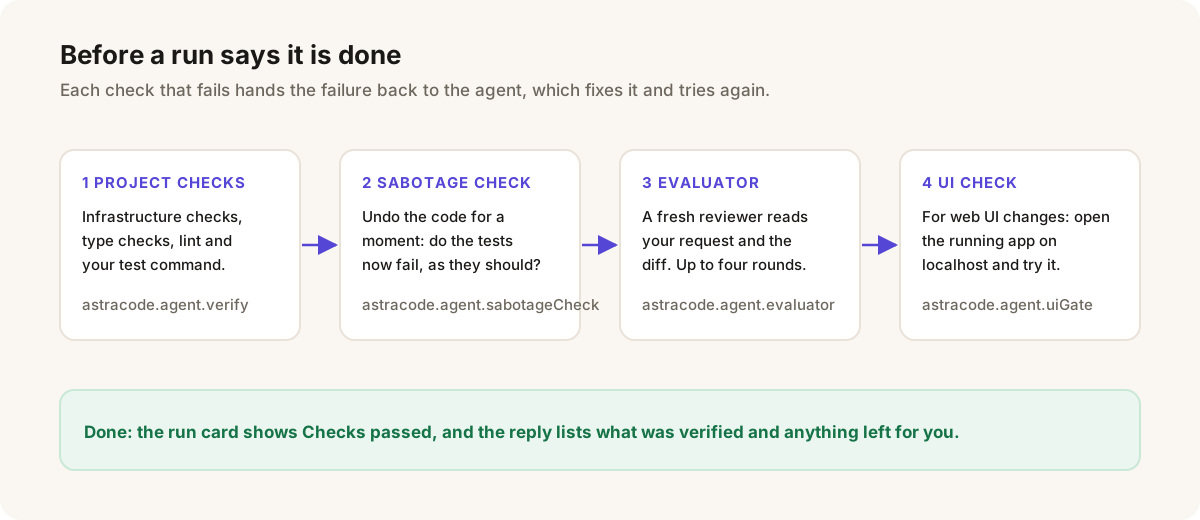
An agent marking its own todo list complete is not evidence that the work is right. So before an Agent or Debug run that changed files can say it is finished, AstraCode runs four checks, in this order. Each failure goes back to the agent with what failed, and the run ends saying a check is failing only when it could not fix it.
Progress shows in the chat as lines labelled Check and Evaluator, and the run card ends with Checks passed or Checks failed.
Your project's checks
AstraCode runs the checks your project already declares, cheapest first, stopping at the first failure. Nothing is guessed: a check runs only if your project has it.
- Infrastructure checks, for files the run changed and tools you have installed:
terraform fmt -checkandvalidate(or OpenTofu's),tflint, trivy, checkov or tfsec,helm lint,kubeconformandhadolint. - Type checks:
tsc --noEmitfor the TypeScript projects that cover the changed files, when TypeScript is installed and you have notypecheckortypesscript; pyright or mypy when configured and installed. - Your scripts:
npm run typecheck,types,lintandformat:check, whenpackage.jsonhas them. A script that fixes or writes (--fix,--write) or that deploys, publishes or pushes is skipped. - Your tests:
npm test(not npm's placeholder script),cargo test,go test ./...,pytestwhenpyproject.tomlhas a[tool.pytestsection, ormake testwhen the Makefile has atest:target.
- Checks run with
CI=1, in the workspace folder. - Each command may take 10 minutes, and one run spends at most 20 minutes checking in all.
- The ladder runs up to three times in a run, and only after the run changed a file or an edit failed.
- A type check or lint that fails only on files the run did not change was failing before it. The chat says ... fails on code this run did not touch; moving on. and the agent is not asked to fix it.
To run one command of your own instead of the whole ladder, set astracode.agent.verifyCommand, such as npm run test:unit when the full suite is too slow. It runs in the workspace folder with a ten-minute limit.
The sabotage check
Passing tests do not prove the new tests test anything. When a run changed both code and tests, and the tests pass, AstraCode briefly undoes the run's code changes, runs the tests with the new tests still in place, and puts the code back.
- If the tests now fail, they test the change. The run card says Tests catch the change.
- If they still pass, they would not notice the change being wrong or missing. The card says Tests miss the change, and the run is sent back once to write a test that would.
- Nothing is undone if a file changed on disk since the run wrote it.
- It does not run in subagents or branch reviews.
The evaluator
Then a second conversation reviews the change with none of the run's history: your request in your words, the diff, and the checks' results. It can read, search and run read-only commands, and must end with a verdict. The chat says Asking an independent evaluator to check the change...
- A failing verdict goes back to the agent with the problems, shown as Not finished yet: N problem(s) found. Fixing them now.
- The fixed change is evaluated again, up to four times in all.
- If a fix round changes nothing, or the rounds run out, the run ends reporting the problems rather than success.
The UI check
When the run changed web UI (files ending .tsx, .jsx, .vue, .svelte, .astro, .html, .css, .scss, .less or .sass, or files under folders such as components/, pages/, views/ and app/), the evaluator also opens the app in a browser, on your machine only:
- It uses a dev server the run already started. Otherwise it starts your project's
dev,start,serveorpreviewscript in the background and waits up to 25 seconds for its address. A plainindex.htmlis opened directly. - It opens the page, goes through the affected flow and reads the console. A console error or a broken flow counts as a blocking problem.
- If no server can be opened, the chat says so, the evaluator judges from the code, and the summary repeats that the UI was not tried.
This works with browser control off. Flutter projects are skipped, and phone screens are not covered.
Before the checks
A run that tries to stop with todo items still open is reminded of them, up to twice. A run that changed files is asked once to re-read your request against what it did, and a run that wrote code in its reply without changing any file is asked to make the change itself.
Settings
| Setting | Default | What it does |
|---|---|---|
astracode.agent.verify | on | Run your project's checks before a run says it is done. |
astracode.agent.verifyCommand | empty | One command to run instead of the detected checks. |
astracode.agent.sabotageCheck | on | Check that new tests fail without the change. |
astracode.agent.evaluator | on | Have an independent evaluator review each change. |
astracode.agent.uiGate | on | Have the evaluator open the app when a run changes web UI. |
Each evaluation is a short extra run and counts against your allowance like any other. Turning a check off makes runs quicker and cheaper and leaves you to check the work yourself.
If something goes wrong
- Checks fail on files you did not touch: they were failing before the run. Fix them separately, or point
astracode.agent.verifyCommandat the check that matters. - Checking takes too long: set
astracode.agent.verifyCommandto a faster command, or turn offastracode.agent.verify. - More on Agent run problems.
← Browser tools Checkpoints and undo →
All documentation
Get started
Using the editor
- Tab completion
- Edit and ask about a selection
- Reviewing the agent's changes
- Git: commit messages, branch review and conflicts
- Dictation
- Layout, themes and the settings page
Agent
- Agent overview
- Agent, Plan, Ask and Debug
- Approvals and permissions
- Plan mode
- Debug mode
- Tools
- Browser tools
- How the agent checks its work
- Checkpoints and undo
- Running several agents at once
- Subagents and background tasks
- Remote agents in GitHub Actions
- Infrastructure as code
Context
Workspaces
Connectors
- Connectors (MCP servers)
- Connector configuration reference
- Use AstraCode from Claude, ChatGPT and other apps
Extending AstraCode
CLI
Account and usage
- Usage and limits
- Bring your own key
- What AstraCode sends and keeps
- Reporting a problem and getting help
Troubleshooting
- Troubleshooting
- Sign-in problems
- Install and update problems
- Chat panel problems
- Agent run problems
- Connector problems
- Dictation problems
- Usage, billing and network errors
- CLI problems